Wednesday, January 28, 2015

OS X Yosemite 10.10.2 released by Apple

This update brings a lot of improvements to OS X. I personally feel the Wi-Fi disconnection and slow web page load issue will make a significant change to the user experience.

Here is what you get with the latest update.

  • Resolves an issue that may cause Wi-Fi to disconnect
  • Resolves an issue that may cause web pages to load slowly
  • Fixes an issue that caused Spotlight to load remote email content when the preference was disabled in Mail
  • Improves audio and video sync when using Bluetooth headphones
  • Adds the ability to browse iCloud Drive in Time Machine
  • Improves VoiceOver speech performance
  • Resolves an issue that causes VoiceOver to echo characters when entering text on a web page
  • Addresses an issue that may cause the input method to switch languages unexpectedly
  • Improves stability and security in Safari
Download the update from Mac App Store. Apple also released iOS 8.1.3

Has anyone updated their Mac yet? Give me your feedback in the comments section.

Apple released iOS 8.1.3 / Reduces space required to update / Also releases OS X Yosemite 10.10.2

The second part of the title is catchy. iOS 8 user adoption has been  noticeably slower than iOS 7 and one of the major reasons was to clear up space on your iPhone before the upgrade.

iOS 8.1.3 is comparatively a small upgrade. Apple apparently is testing iOS 8.2 currently to be released inline with their Apple Watch ahead this year.

Are you expecting a feature or fix that you did not find with iOS 8.1.3? Make them hear in the comments section!

Wednesday, October 22, 2014

Apple rolls back Camera Roll

camera roll on iOS 8.1For those of you who were shocked seeing photos deleted from your iPhone after the iOS 8 update, you just got tricked by Apple. You would have figured that out by now.

With iOS 8.1 your Camera Roll makes a victorious return. If you have enabled your iCloud Photo Library, the 'Camera Roll' will be replaced with 'All Photos'.

Wednesday, September 24, 2014

Clean App Switcher in iOS 8

You see recent and favorite Contacts in App Switcher after upgrading to iOS 8. Wish you could take them down? Follow along!
When you double click your home button, you see your recent apps which you can quickly switch between. With iOS 8 you also see avatars of your most recent and favorite contacts.

This feature is useful, but if you like it clean, you can have your way.

To disable your contacts from displaying in the app switcher -
  • Launch your Settings app
  • Select Mail, Contacts, Calendar
  • Under Contacts section select Show In App Switcher
Toggle the switch to disable your recent, favorites, or both contacts.

Wednesday, September 17, 2014

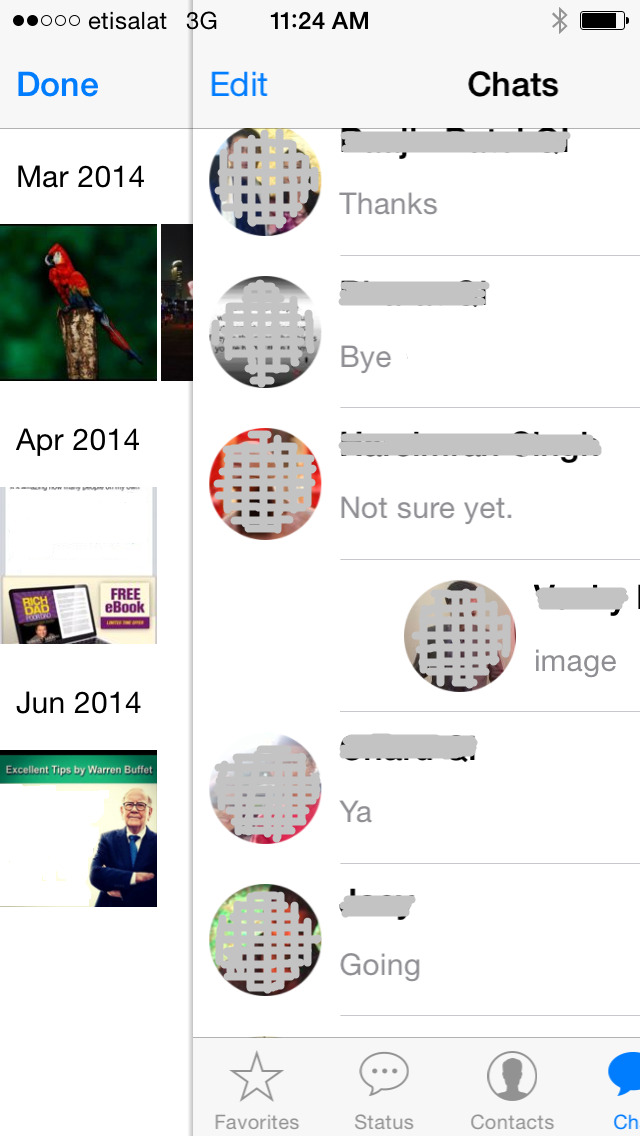
WhatsApp reveals shared media in a slide

This is a little less known feature I recently discovered on iOS 7 (iOS 8 is round the corner).

To see all media (images / videos) shared between you and your friend or group, one can of course

  • Open the friend's (or group's) chat window
  • Click on the friend's (or group's) name on top
  • Click on View All Media

The quicker way is to slide your finger from left to right on a particular friend (or WhatsApp group) from your chat list and you directly are in the View All Media screen.

Thursday, September 11, 2014

WhatsApp: Difference between Broadcast Lists and Groups

and how to use them appropriately?

Broadcast Lists in WhatsApp

The Broadcast feature lets you send a message to many of your friends at once, without revealing the recipients to one another and each recipient then has the option to respond to you individually.

What more? You can now create Broadcast Lists and save the list of contacts to whom you send Broadcast Messages. Broadcast Lists are saved lists of message recipients that you can repeatedly send Broadcast Messages to, without having to select them each time.

Note: In order to be able to send a Broadcast Message to a specific contact, that person must have your phone number saved in their address book. Just a way to avoid Spams.

Groups on WhatsApp

Groups on the other hand creates a common space where up to 50 participants can be added to chat and collaborate together.
  • A maximum of 50 participants can be added to a group you create.
  • You can create a max of 50 groups.
  • Every group in WhatsApp has a group admin. If you create a group, you are the admin by default. Only the group admin can add people to the group chat.
  • As a group admin you can control the participants in the group. If a group admin leaves the group, WhatsApp will randomly assign an admin to a remaining group participant.
  • As a group member you can control your own participation in a group chat. You may wish to stay or leave the group when you wish.

WiFi calling on Apple iPhone 6 & iPhone 6 Plus

You will be able to make regular calls to people over a WiFi connection if and when you have a poor network reception.


What is WiFi calling?
WiFi calling uses WiFi to enable voice and SMS to provide better mobile phone coverage in low cellular reception areas.

How does it work?
Moving past the technicalities, WiFi calling is a phone related feature which can be enabled by navigating to Settings / Phone / WiFi Calling and toggle the switch to ON.

Benefits?
  • Voice and SMS over WiFi
  • Improved battery life since it's only using one radio connection
  • Hop from one network to another seamlessly. Start a call over WiFi at home, then step outside and the call will switch to your cellular network automatically and seamlessly without disruption.
  • Hi-def audio calling.
How would calls be billed?
This is going to be operator specific and we will need to wait to hear more on this technology and service plan parameters. 

Will this work anywhere in the world?
I wish this was a good news but this is only supported by selected operators around the world yet. Several operators around the world have WiFi calling services, including T-Mobile US, Orange UK and Rogers Wireless in Canada. We will have to wait until Apple ends up with a deal with Etisalat or Du in UAE or other operators around the world.

Is it iPhone 6 only feature or will it support all iOS 8 enabled devices?
9to5mac.com says "WiFi calling is one of several new Phone-related features in the pipeline for iOS 8."
gizmodo.com says "You'll be able to call people using your WiFi connection on the iPhone 6."
appleinsider.com says "T-Mobile confirms support for Wi-Fi calling on iPhones running iOS 8."

I guess it's a matter of time when we'll clear the hazy air.